In Microsoft Dynamics NAV 2016 CU1, support for VS2015 Community Edition has been implemented.
However if you do a default install of VS2015CE, the RDLC editor is not included and your report will show up as XML instead of the visual designer.
To fix this, enable Microsoft SQL Server Data Tools as part of the installer.
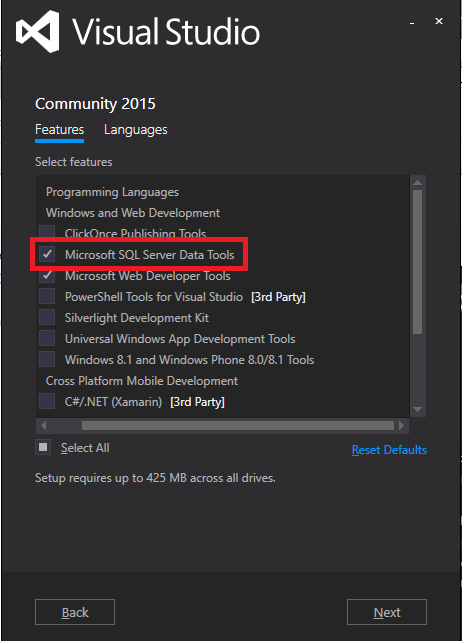
And it works again.
Editors Note: On this website you will find a longer description of the issue.
 Marije...
3 responses to “Tip #55 | Add RDLC option to Visual Studio 2015 Community Edition”
VS2016CE doesn’t exist.
It’s VS2015 (CE), but works on Professional/Ultimate as well.
LikeLike
And remember that the community edition is not for commercial usage.
LikeLike
[…] zusammen! Anbei ein neue Informationen Cumulative Update 2 NAV 2016 verfügbar Visual Studio 2015 Tipp NAVTALK 11/15 vollständig (einmalige Ausnahme wegen der Themenbesonderheit) Neues NAV 2016 […]
LikeLike